


All Products
-
Microwave Motion Sensor
-
Dimmable Motion Sensor
-
Presence Detectors Sensor
-
Dimmable LED Driver
-
PIR Motion Sensor
-
On Off Function Sensor
-
Sensor Driver
-
Daylight Sensor
-
DC Motion Sensor
-
UL Motion Sensor
-
DALI Motion Sensor
-
Wireless Motion Sensor
-
DALI2.0 Dimmable LED Driver
-
DALI Dimmable LED Driver
-
1-10V Dimmable LED Driver
-
Triac Dimmable LED Driver
-
LED Emergency Driver
-
IOT Driver
Contact Person :
June Zhao
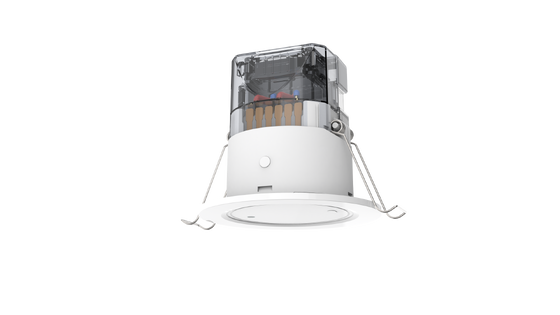
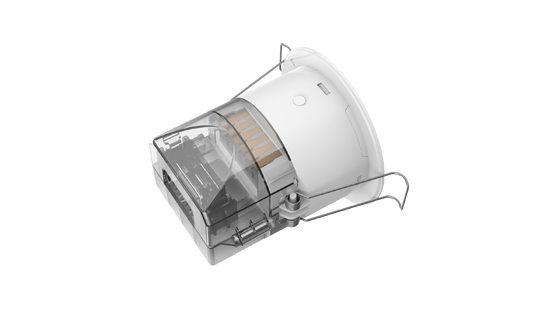
3 step installation 24GHz microwave motion and occupancy detectors with remote control capability


| Place of Origin | Shenzhen, China |
|---|---|
| Brand Name | Merrytek |
| Certification | CE, UKCA |
| Model Number | MSA246S 99 |
| Minimum Order Quantity | 100PCS |
| Price | Negotiation |
| Packaging Details | Color box + K=K carton |
| Delivery Time | 1, Sample and small order: Within 5 working days after receiving your payment. 2, Bulk order: 3-4 weeks after receiving deposit. |
| Payment Terms | T/T |
| Supply Ability | 10000 pcs/month |
Product Details
| Working Voltage | 220-240Vac 50Hz | Working Mode | 16A Relay ON/OFF |
|---|---|---|---|
| Mounting Height | 2.5-4.0m | Life Time | 5 Years Warranty@Ta 230V Full Load |
| Version | Microwave Motion And Occupancy Detectors | Load Type | 600W(Inductive); 1200W (Resistive) |
| Working Frequency | 24GHZ-24.25GHz | IP Rating | IP20 Flush Mounting; IP54 Surface Mounting |
Product Description
3-step installation 24GHz microwave motion and occupancy detectors with remote control capability
MSA246S 99 is a 24GHz radar sensor based on Merrytek's patented orthogonal antenna. Its antenna has high gain and a wide detection range. Combined with Merrytek’s unique software algorithm and FMCW modulation, it can accurately detect micro-movements brought by humans in almost all indoor spaces to automatically turn on or turn off lighting, etc electrical appliances.
- Detect micro-movements brought by breathing
- Daylight threshold/daylight priority/Pure daylight mode available
- Sensor parameters adjustable by knob switch or MH10/MH18 remote
- Not affected by temperature, humidity, noise, airflow, dust, light, and other environments
- Flush mounting and surface mounting(extra surface mounting kit needed) installation available
- 5 years warranty
Technical Parameters
| Input/Output | Input voltage | 220-240V AC 50/60Hz |
| Rated voltage | 230V AC | |
| Consumption | ≤2W @230V AC | |
| Output signal | 16A relay ON/OFF | |
| Max surge voltage | 2KV(L/N,EN61000-4-5) | |
| Max surge capacity | 30A(50% Ipeak, twidth =500uS, 230Vac full load, cold start) | |
| Max loading | Max 1200w resistive loading and 600w inductive loading | |
| Sensor Parameter | Sensor technology | 24GHz radar sensor+daylight sensor |
| Detection Area | Knob switch or MH10/MH18 remote setting: 0.5m-4m | |
| Hold Time | Knob switch or MH10/MH18 remote setting: 10s/30s/1min/3min/5min/10min/20min/30min | |
| Daylight Sensor Threshold | Rotation switch or MH10/MH18 remote setting: 30Lux/50Lux/100Lux/150Lux/Disable | |
| Pure daylight threshold mode |
When the sensor enters pure daylight threshold mode, the sensing function is override, sensor will only turn the light on or off based on the daylight thresholds below: 30lux light on,100lux light off 50lux light on,200lux light off 100lux light on,300lux light off 150lux light on,400lux light off |
|
| Daylight priority mode |
30lux light on,100lux light off 50lux light on,200lux light off 100lux light on,300lux light off 150lux light on,400lux light off |
|
| QS1+100% detection range radius | major/minor/micro-movement(3m height installation): 3.5±0.5m(based on 41㎡ open area test and might change due to different space) | |
| Remote control | Available(MH10/MH18) | |
| Mounting height | 2.5-4.0m typical value:3m | |
| Application Environment | Drill hole | Φ65mm |
| Working Temperature | 0℃...+50℃ | |
| Storage Temperature | -25℃~+50℃, Humidity ≤60%(non-condensation) | |
| Warranty | 5 years((only for product quality problem)) | |
| Certificate Standard | Certificate | CE ROHS |
| Environmental Requirement | Compliant with RoHS | |
| IP Rating | IP20 | |
| Note: "N/A" means not available. | ||

The sensor detects human walking, slight motion (such as body movement, turning the head, and other minor movements), and breathing to enable detection of human presence in non-sleep states.
- Movement signal: Large movements that trigger sensor activation within the detection area
- Slight motion signal: Very small movements including leaning forward, leaning back, body swinging, head shaking, typing, and mobile phone usage
- Breathing signal: Detection of breathing patterns through abdominal and chest cavity dilation
Dimensions (unit: mm)
Wiring Diagram
Installation Instructions
Flush Mounting
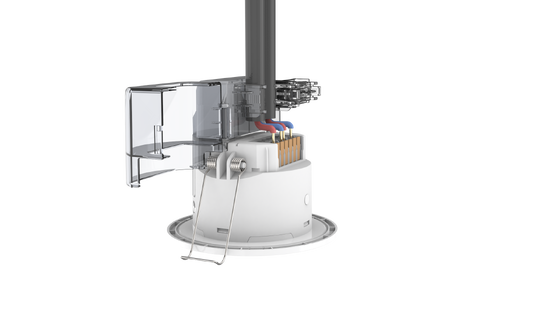
- Cut a 65mm hole in the ceiling
- Remove the crimping cover using a flat-head screwdriver
- Connect the wire to the terminal
- Install the wire cover and press the wire securely
- Bend the spring clamp backward to push into the pre-opened ceiling hole
- Ensure stable and reliable installation
Detection Pattern
Important Notes:
- Detection range varies based on person size, material, covering thickness, and environmental factors
- Millimeter wave signals can penetrate non-metallic materials like glass and thin walls, but cannot penetrate thick load-bearing walls or metal doors
Remote Control (MH18 or MH10)
Initialization Process
When powered on, the sensor indicator will turn off after flashing for 10S and will enter a 10S detection cycle. If presence is detected, then the sensor will report presence and enter hold time calculation; if absence is detected, then the sensor will report absence. During initialization, the sensor will not detect a moving signal, and you can use our MH10/MH18 remote or rotation switch to adjust detection area, hold time, and daylight sensor, etc. parameters.
Factory Default Settings
- Detection Area: 4M
- Hold Time: 30S
- Daylight Sensor: Disabled
- Indicator Light: Open
Rotary Switch Settings
Detection Area Settings
| Gear | Radius range |
| 1 | 0.5m |
| 2 | 1m |
| 3 | 1.5m |
| 4 | 2m |
| 5 | 2.5m |
| 6 | 3m |
| 7 | 3.5m |
| 8 | 4m |
Hold Time Settings
| Gear | Hold time |
| 1 | 10s |
| 2 | 30s |
| 3 | 1min |
| 4 | 3min |
| 5 | 5min |
| 6 | 10min |
| 7 | 20min |
| 8 | 30min |
Daylight Sensor Mode settings:
| Gear | Daylight mode |
| 1 | Light control |
| 2 | Priority |
| 3 | Bright and dark |
| 4 | Disable |
*When setting to disable, our sensor will turn on the light when motion detected regardless of environment daylight
Daylight Sensor Settings
| Gear | Daylight mode |
| 1 | 30lux on/100lux off |
| 2 | 50lux on/200lux off |
| 3 | 100lux on/300lux off |
| 4 | 150lux on/400lux off |
Application Guidelines
1. Sensor shall be installed and wired by a professional electrician
2. There shall be no high-power electrical appliance or high-power wireless device around our sensor to avoid interference and false triggers
3. Sensor clearance shall be longer than 2m if there are many sensors in your installation room
4. The sensor shall NOT be installed on shaking objects, and there shall be NO large metal, water pipeline, air draft, or ventilation system around our sensor to avoid interference and false triggers
5. There shall be NO strong lighting around our sensor to avoid daylight sensor false detection
6. The above sensor detection area data is based on 165cm high and 65kg heavy test people walking towards the sensor in a 41㎡ open area for your reference. When the sensor is installed in a different environment with a different test person, the real detection data might differ.
Recommended Products